Newton's Third Law
About this simulation
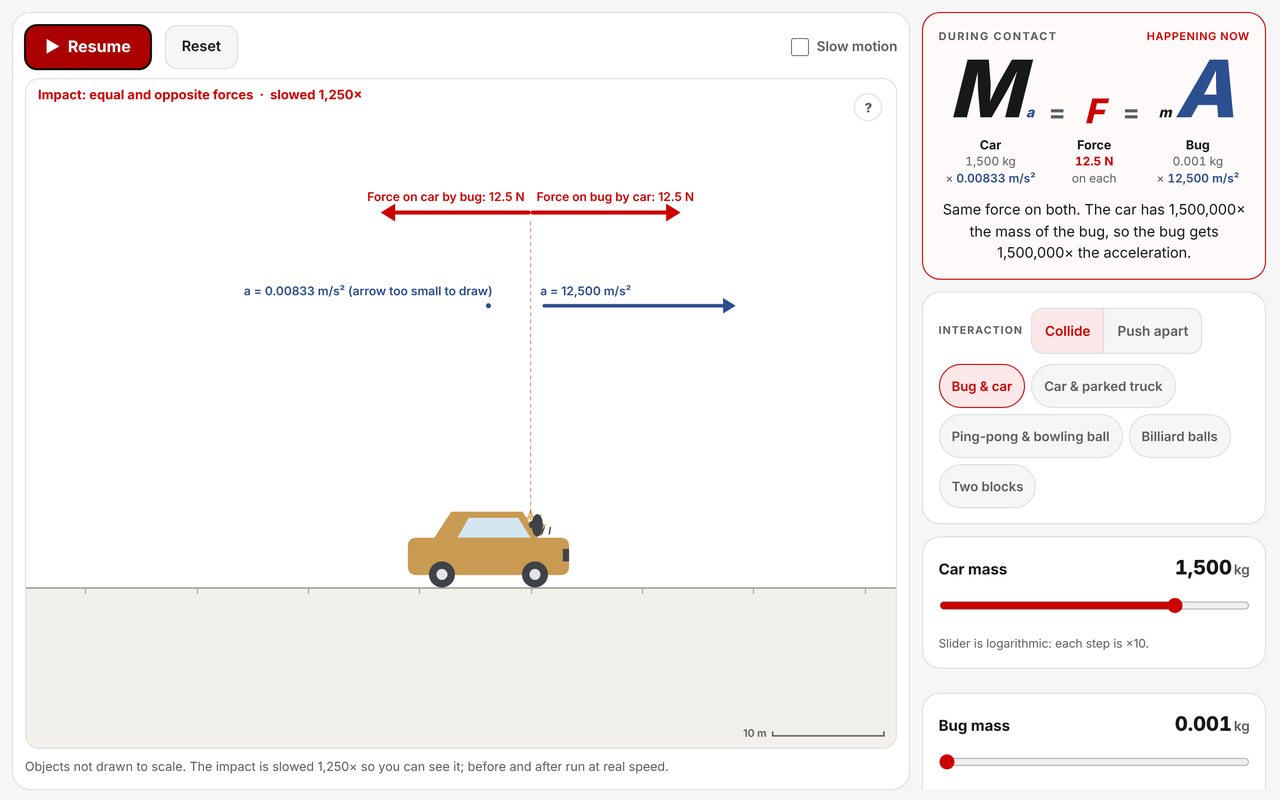
When two objects touch, each pushes on the other. Red arrows show those two forces: always the same size, always opposite. Blue arrows show the accelerations, and those are not the same. The same force has a bigger effect on a smaller mass.
The equation panel writes it as Ma = F = mA, with each letter sized by its value. A bug hitting a car gets a tiny m and a huge A; the car gets a huge M and a tiny a. After contact the force is gone, so each object just keeps its speed — all three laws in one run.
The contact force is held steady while the objects touch, so it is easy to compare. Masses and contact times are round numbers chosen for illustration, objects are not drawn to scale, and the impact is shown in slow motion; before and after run at real speed.
Learning Goals
- State that the forces in an interaction pair are always equal in size and opposite in direction
- Explain why equal forces can give very different accelerations (a = F / m)
- Use the ratio of masses to predict the ratio of accelerations
- Recognise that once contact ends, each object keeps moving at constant velocity
- Resolve the common misconception that the bigger or faster object pushes harder
How to Use
- Choose Collide or Push apart, then pick a pair of objects
- Before pressing Start, predict which object feels the bigger force
- Press Space to pause during contact and compare the red arrows, then the blue ones
- Change a mass with its slider (each step is ×10) and watch the force stay equal while the accelerations change
- Try Billiard balls (equal masses) and Skater & wall (the wall is attached to the whole Earth)
- Switch to Full to see velocities, contact time and the clock
Classroom Notes
Start with Bug & car: ask the class which feels the bigger force, take a vote, then pause mid-impact. Simple detail is the default; Full adds velocity readouts. Momentum and impulse language is deliberately left out — the companion Impulse & Momentum simulation picks up from here.